目次
How to Open an XM Account

Naturally, after registering with XM, you cannot trade unless you create a trading account.
This article explains how to open an XM account on your smartphone.
Opening/Adding an XM Account
As of 2025, opening or adding an XM account is done through the webpage.
You cannot create an account from the app.
Two Ways to Open/Add an XM Account
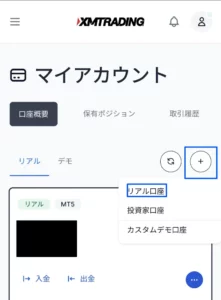
- Tap "My Account" from the menu on the top left
- Tap the + icon
- Tap "Real Account"
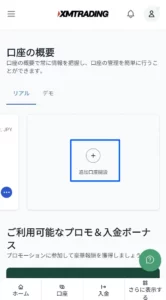
Or
- Swipe right on the first screen after logging in
- Tap "Open Additional Account"
The procedure for adding an account from here on is the same.
Select MetaTrader Type
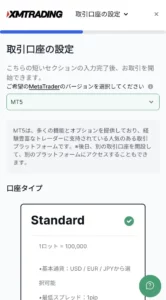
- Select MT4 or MT5
Since MT5 is selected by default, MT5 is recommended unless you have a specific reason not to use it.
Select Account Type
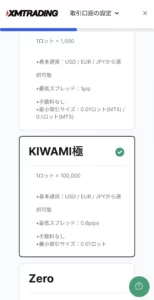
If you still have a Deposit Bonus remaining, Standard or Micro accounts are also options,
but basically, you should use the KIWAMI Extreme Account.
If your deposit amount and trading volume are large, the Zero Account is also an option.
Transaction fees can sometimes be deducted as expenses for tax purposes, potentially lowering the total spread cost.
Select Leverage and Base Currency
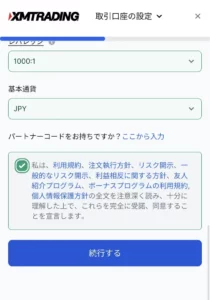
Leverage is up to 1,000x for Standard and KIWAMI Extreme accounts,
and 500x for the Zero Account.
Here too, unless you have a specific reason, it is best to use the maximum leverage.
For the base currency, your local currency (e.g., JPY) is recommended for easier tax reporting,
but some people find that trading in USD or EUR, where the numbers are smaller, allows them to trade more calmly like a game, so foreign currencies are also an option.
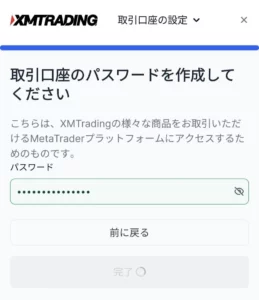
Finally, set a password and you are done.
You will receive an email confirming that the account opening is complete.