What is MT5/MetaTrader5?
It is the most popular trading tool in offshore Forex.
While the older version, MT4, is still in use, MT5 is currently the standard.
Using MT5 is also the standard for trading with XM.
MT5 works on both PC and smartphones, but this article explains how to connect using the smartphone app version.
How to Connect Your XM Account to the MT5 App
You need three things to connect the account you created on XM to the MT5 app and start trading:
- Account ID (Login)
- Password
- Server Number
For recently opened accounts, the Server Number is likely "XMTrading-MT5 3".
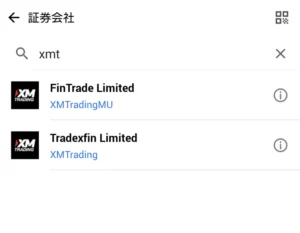
- After launching the MT5 app, first tap "Settings" (or "Manage Accounts") → the "+" icon at the top right.
- Tap "Find Broker".
- For XM, type "xmt" and tap "Tradexfin Limited" when it appears.
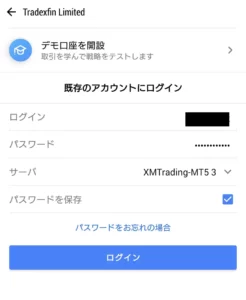
- Enter your Account ID in "Login".
- Enter your Password and Server Number respectively.
- Tap "Login" (or "Sign In").
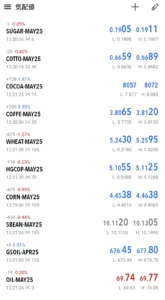
If you log in successfully, the list of trading pairs will be displayed.
For some reason, when you log in to the smartphone version of MT5 with XM, only niche symbols like Sugar, Cocoa, and Coffee futures are displayed initially.
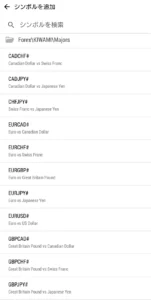
Tap the "+" at the top right to add symbols.
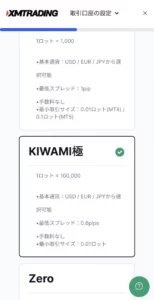
In the case of the KIWAMI account:
- ForexKIWAMIExotics → Rand, Turkish Lira, etc.
- ForexKIWAMIMajors → As the name suggests, major pairs like USDJPY and EURUSD.
- ForexKIWAMIMinors → Not really minor, but includes currency pairs involving AUD (Australian Dollar) and NZD (New Zealand Dollar).
- CryptocurrenciesKIWAMI → Virtual currencies/Crypto assets like Bitcoin (BTCUSD).
- DerivativesMetals KIWAMI → Precious metals like Gold (GOLD/XAUUSD).
They are categorized like this.
You can also search by typing characters directly into "Find Symbols".
Regarding the popular Gold symbol, please note that in XM it is listed as "GOLD" instead of "XAUUSD".