目次
Explanation of Deposit Methods on XM
XM offers an account opening bonus (no-deposit bonus),
but once you use up the bonus, you cannot trade unless you deposit actual funds.
This article explains the various deposit methods available on XM.
The recommended methods are Bank Transfer or bitwallet.
List of XM Deposit Methods
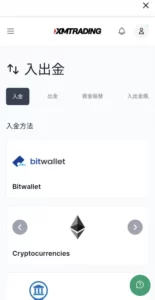
bitwallet (Recommended)
bitwallet is a money transfer service that can be used with most overseas FX brokers.
Its weak point is that a fee is charged when withdrawing from bitwallet to your bank account.
However, its advantages are that it is supported by many overseas FX brokers and the deposit/withdrawal speed is fast.
If you are an overseas FX trader, it is very convenient to have an account opened.
Bank Deposit (Recommended)
The peace of mind that comes with cash payments.
The transfer speed is not the fastest, but unlike credit cards, there is no risk of debt or revolving payments, so I believe you should generally use bank transfers.
Please note that the sender's name must be entered in the alphabet and include your MT4/MT5 account number!
Credit Card (Recommended)
In terms of deposit speed, credit cards are the fastest.
However, just as credit card deposits are prohibited in domestic FX in some countries for the safety of traders,
you must keep in mind that being able to deposit money you do not have on hand = the risk of getting into debt.
There is no point in using an overseas FX broker with a zero-cut system if you end up saddled with debt or revolving payments.
If your bank supports debit cards, it is practically the fastest method and allows you to transfer money without the risk of debt, so if you have a debit card, you should use that instead.
Cryptocurrency
The cryptocurrencies you can use to deposit into XM are as follows:
- Bitcoin (BTC)
- Ethereum (ETH)
- Tether (USDT)
- Ripple (XRP)
- Litecoin (LTC)
Since Bitcoin and Ethereum have slow transfer speeds and carry the risk of price fluctuations before the funds arrive,
you will normally use Tether, which has fast transfers and no extreme price changes since it is pegged to the US dollar.
When transferring from an overseas crypto exchange to XM, these cryptocurrencies are your only option, but otherwise, you probably won't use them much.
If you absolutely want to use something other than Tether, the top two priorities in terms of transfer speed and low fees are:
- Ripple (XRP)
- Litecoin (LTC)
XRP was originally designed for payments, so it is characterized by fast transfer speeds and cheap fees.
LTC is also excellent in both speed and low fees, although not quite as much as XRP.
How to Make a Bank Deposit to XM
The first time you do this, you need to check the destination bank account details.
- Tap "Deposit/Withdrawal" from the menu on your My Page.
- Tap "Local Bank Transfer".
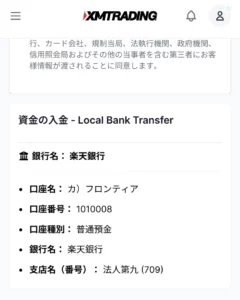
- Scroll down to confirm the deposit destination.
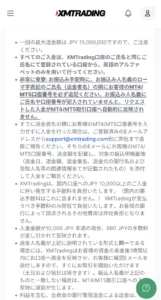
- Important Notes for the Sender
Quote from the official website:
All deposits must be made from an account registered under the same name as your XMTrading account, using only the English alphabet.
Very Important: When arranging the transfer, you must add your MT4/MT5 account number next to your romaji name (sender's name). If your name and account number are not included in the sender's details, the requested deposit will not be automatically reflected in your MT4/MT5 trading account.
In other words, the sender's name must be in the format of:
- First Name (Alphabet) Last Name (Alphabet) + XM Account Number
- Example: JOHN SMITH 20000000